Data Types: Manual
If you want to retain control over data types for each column in your table, you can use Manual option in the Data Types dropdown. The down side is that …
In Automation We Trust

If you want to retain control over data types for each column in your table, you can use Manual option in the Data Types dropdown. The down side is that …

If you are lazy person like us, you will likely want to use Autodetect option for detecting the data types: This is a very helpful option when your table has …

If your table has a datetime column and you are using either Manual or Autodetect option for upload, it’s important to make sure your column is formatted properly because BigQuery …

On rare occasions, it may happen, that you only see “Help” button in the add-on menu and no other items: How to get around it? Unfortunately, you have to uninstall …
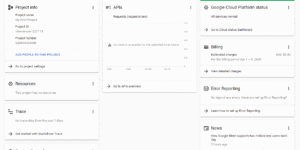
Before you can upload anything from Google Sheets to BigQuery with our BigQuery uploader for Google Sheets, you need to enable BigQuery API in your Google Cloud Platform (aka “GCP”) …

You may run into issues with your date column during uploads: Uploads failing because of incorrect formatting of your date column – this applies mainly to Manual option under Data …

2020-10-19: Version 2.1 Released 2 updates: 1) We’ve added an option to enable email notifications in case your scheduled upload fails: Please make sure to always “Save Schedule” when you …

One would think that uploading multiple sheets from a Google spreadsheet to BigQuery would be natively supported since both products come from Google, right? Too bad! BigQuery only supports uploading …
The Problem So what’s the problem? You may have been playing with Google BigQuery and you may have noticed that you can use an already existing Google Sheet as data …

When it comes to Microsoft’s business intelligence products, understanding the basic terms can be complicated – especially if you are just diving into data & analytics. So let’s answer the …